
If you sell snacks, beverages, home care, or any daily-use product, quick commerce is no longer optional. Platforms like Blinkit( with their own Blinkit Advertisement) have reshaped how urban India shops for essentials—fast, frequent, and driven by urgency. Backed by Zomato, Blinkit has become a daily habit across top Indian cities. Consumers open the app not to browse, but to buy—often expecting delivery in minutes. That shift has made Blinkit advertising a powerful, high-intent growth channel for FMCG and D2C brands, complementing search, social, and marketplace marketing.
This guide breaks down how Blinkit ads work, why they matter, ad formats, costs, bidding, and how brands can launch and scale campaigns effectively
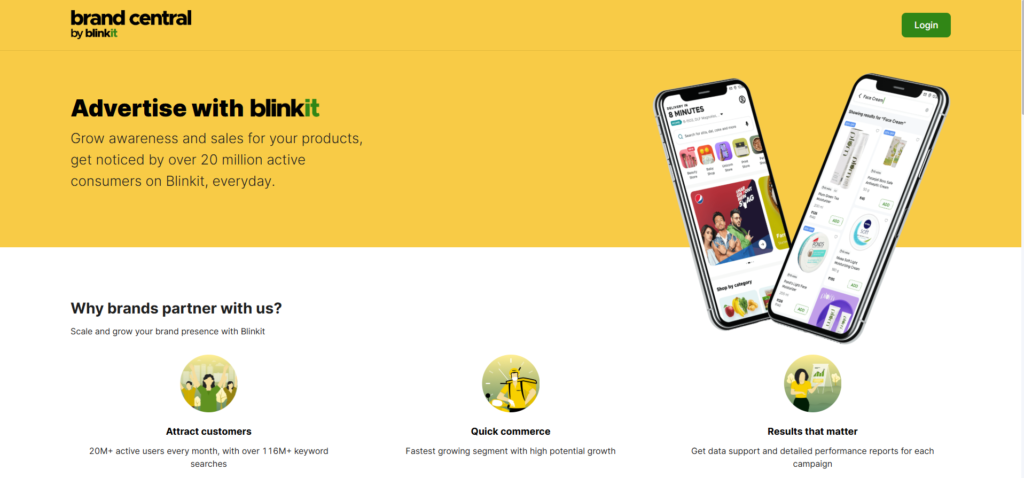
What Is Blinkit Advertisement and Why Should Brands Care?
Blinkit is an instant grocery delivery app where users order essentials like snacks, beverages, personal care, and household products for ultra-fast delivery. Blinkit advertisements are paid placements within this shopping journey.
Your brand can appear as:
- A sponsored result when users search for keywords like “chips” or “detergent”
- A promoted product in category pages such as snacks or pet care
- A banner on the home page or category pages
- A recommended product on product detail pages, cart pages etc
This visibility matters most for FMCG, essentials, and D2C brands selling products consumed at home—chips, cold drinks, instant noodles, shampoos, soaps, cleaners, pet food, and more. Blinkit ads help brands capture impulse purchases and repeat orders at the exact moment of need.
Blinkit Ads Explained in Simple Terms
Think of Blinkit ads like premium shelf placement in a supermarket.
Instead of your product sitting unnoticed on the bottom shelf, it moves to eye level. When a user searches for “juice,” your brand shows at the top. When they browse the snacks category, your product appears first.
You’re paying for better visibility inside a busy digital store—one that lives on your customer’s phone and is opened with a clear buying intent.
Why Brands Should Advertise on Blinkit Today
Blinkit ads work because they tap into real buying behavior, not passive browsing.
Key advantages:
- Shoppers place multiple orders every week
- Strong presence in metro and Tier-1 cities
- High-intent traffic—users open the app to buy
- Faster product testing for new SKUs
- Level playing field for D2C brands against large incumbents
- Strong push from Blinkit itself through platform growth and partnerships
Why Blinkit Ads Perform So Well for FMCG, Essentials & D2C Brands
- FMCG Brands – Snacks, chocolates, and ready-to-eat foods benefit from top-of-search visibility, driving trials and repeat purchases quickly.
- Essentials & Daily-Use Products – Detergents, cleaners, shampoos, and pet food are purchased on autopilot. Sponsored placements help you win share of basket in crowded categories.
- D2C Brands – Blinkit offers direct access to customers without waiting for organic discovery. With the right pricing and placement, niche brands can scale fast.
How Blinkit Advertising Works: Targeting, Placements, and Process
Blinkit advertising is straightforward at its core. Brands select the products to promote, decide where the ads should appear, and set a budget. Blinkit then shows these ads to shoppers who match basic targeting criteria within the app.
While Blinkit’s targeting options are not as granular as platforms like Google or Meta, the purchase intent is significantly higher. Users are already on the app to buy, not browse. Success on Blinkit comes from choosing the right categories, locations, and ad formats—and continuously optimising based on performance.
Targeting Options on Blinkit
Brands can typically target by:
- Keywords that a customer may type to find you products
- Location, such as city or pin code, to focus on areas where the instant delivery service is guaranteed fast and reach your top markets.
- Category, such as snacks, dairy, personal care, or pet care.
While targeting options are simpler than Google or Meta, intent is significantly stronger because users are already shopping.
Where Blinkit Ads Appear?
Blinkit ads can show across multiple placements:
- Search results at the top when shoppers type a keyword. Great for intent and direct sales.
- Category pages when users browse “snacks” or “personal care”. Good for discovery and share of shelf.
- Homepage banners, which are more visual and work well for big offers or new launches.
- Product detail pages, where you can cross-sell or push related SKUs.
- Recommendation spots, such as “you may also like”, which support upsell and basket size.
Each placement supports a different goal—from awareness to direct sales.
Blinkit Campaign Workflow
Here is the Blinkit marketing approach, a clear flow to launch your first campaign.
Step 1: Complete Business Onboarding on Blinkit –
Onboarding means setting up your seller or brand account. You share GST, PAN, bank details, and basic business information. You also submit product and brand details for review. Approval process takes a few days.
Step 2: Add and Optimize Your Product Listings
Next, add each product with:
- Clear name and short description
- Bright, front-facing images
- MRP and offer price
- Accurate stock levels
To optimize, use simple titles that match what people search, highlight one or two key benefits in the description, and upload sharp pack shots. Strong listings is the key better conversions, because first impression is the last impression.
Step 3: Create Your First Blinkit Ad Campaign
Set a clear objective for your advertising strategy such as “Boost hero SKUs”. Then pick the ad format (Product booster, Recommendation etc). Select the targeting and locations followed by budget(daily or total).
Step 4: Put Budget, Launch, and Monitor KPIs
Set your ad budget and campaign dates for the marketing campaign, then go live.
Watch a few simple numbers:
- Impressions (how many times ads were shown)
- ATC and CTR (how often the products were added to Cart after seeing it)
- Sales and ROAS (how much revenue was generated and the returns)
Campaigns needs time to build learnings, so give it some time before updating anything.
Step 5: Analyze Results and Keep Improving
Analyse the performing products, cities etc and move the budgets accordingly.
Bidding on Blinkit Ads
Blinkit follows an auction-based bidding model. The higher the CPM you bid, the higher chances of winning the auction. The CPMs may differ for every category , time period and level of competition.
Blinkit Brand Reports & Measurement
Blinkit’s self-serve platform provides detailed performance insights, helping brands better understand ad effectiveness and optimise strategies.
- Reach Campaign Reports: Impressions, add-to-carts, campaign cost
- Performance Campaign Reports: Impressions, add-to-carts, sales, ROAS, and new user acquisition
These insights helps you make smarter decision-making for campaigns and effective budget planning.
Blinkit Advertisement vs Other Quick-Commerce Platforms
Blinkit advertising works in a highly competitive quick-commerce market, where Instamart and Zepto also target the same urban customers. Most brands try advertising on multiple apps, but Blinkit stands out because of its strong presence in top cities, fast deliveries, efficient local operations, and focused product range. Advertisers usually test all platforms first and then move budgets based on real results like cost per order and repeat buying.
Blinkit vs Instamart: Which Should Brands Prioritise?
Instamart gains from the larger Swiggy ecosystem and usually offers wider reach across cities. Blinkit, supported by Zomato, is especially strong in select urban pockets and is heavily investing in marketing and brand partnerships. For most brands, the best strategy is to test both platforms, compare results, and scale budgets where visibility, repeat purchases, and efficiency are highest. In many metros, Blinkit can deliver better impact at the same ad spend.
Blinkit vs Zepto: Key Differences for Advertisers
Zepto, like Blinkit, focuses on instant delivery and urban convenience, with a strong emphasis on 10-minute fulfilment. However, product range and local reach can differ by neighbourhood, largely depending on last-mile logistics strength. For brands new to quick-commerce advertising, Blinkit often works as an easier starting point when the target audience is concentrated in Blinkit-dominant cities. Once the brand finds the right product-market fit, expanding to Zepto becomes a natural next step to drive additional scale.
Challenges of Advertising on Blinkit
While Blinkit can drive quick conversions, brands may face a few challenges on the platform:
High competition – Blinkit’s popularity attracts many advertisers, especially in FMCG and essentials. This increases competition for visibility and can push up ad costs.
Ad fatigue – Showing the same creatives repeatedly can reduce engagement over time, leading to lower click-through rates and impact.
Limited targeting options – Compared to Google or Meta, Blinkit offers fewer audience targeting controls, making precise segmentation difficult.
ROI measurement challenges – Measuring exact returns is not always easy because of Blinkit’s unique shopping flow and limited integration with external analytics tools.
Creative restrictions – Strict creative guidelines limit flexibility and make it harder to experiment with different formats and designs.
Best Practices to Improve Your Blinkit Ads Performance
- Use a smart keyword strategy – Mix generic keywords like “chips,” “hair oil,” or “cat food” with brand terms, and keep all keywords closely relevant to the product. Track search behaviour and align titles and creatives with what shoppers are actively looking for.
- Lead with clear offers and value – Offer-led ads perform best on Blinkit. Simple, easy-to-see deals such as “Buy 1 Get 1,” flat discounts, or value packs drive quicker purchase decisions. Make the offer prominent on banners or pack visuals.
- Use mobile-optimised, high-quality images – Most users shop on mobile, so use clean, bright visuals with clear front-facing packs. Keep offer text readable at a glance to improve clicks and conversions.
- Plan for festive and high-demand moments – Launch focused campaigns during festivals, IPL, and seasonal peaks. Categories like snacks, beverages, and home care typically see strong lifts during these periods.
- Test and optimise regularly – Review performance often, change bids, pause underperforming SKUs, refresh creatives, and test new offers. Regular optimisation helps maintain efficiency as competition increases.
Final Thoughts
Blinkit advertising puts your brand in front of shoppers who are ready to buy immediately. For FMCG, essentials, and D2C brands, it delivers faster insights, shorter sales cycles, and strong repeat purchase potential.
As quick commerce keeps expanding, brands that learn and scale on Blinkit early will gain better visibility, build loyalty, and create a long-term edge in India’s most competitive urban markets.
You can purchase Blinkit Asset ebook through this link.
Pingback: How to sell on Blinkit - 1 easy guide for absolute Beginners - Harshit Maggo