

Flipkart Ads has launched Budget Rules, a new automation feature for Product Listing Ad (PLA) campaigns that helps advertisers automatically increase campaign budgets based on campaign performance or predefined schedules. The feature aims to reduce manual intervention while ensuring high-performing campaigns continue to receive visibility even when budgets are close to exhaustion.
This update is particularly valuable for advertisers managing multiple campaigns or preparing for high-traffic periods such as weekends, festive sales, and promotional events.
What Are Budget Rules in Flipkart Ads?
Budget Rules are automated conditions that increase the budget of a PLA campaign without requiring manual updates. Instead of continuously monitoring campaign performance and adjusting budgets throughout the day, advertisers can configure rules that trigger budget increases when specific conditions are met.
The primary objectives of Budget Rules are to:
- Prevent high-performing campaigns from running out of budget.
- Reduce the manual effort involved in campaign budget management.
- Automatically allocate additional budget during periods of high shopper demand.
Which Campaigns Support Budget Rules?
Currently, Budget Rules are available only for Flipkart Product Listing Ad (PLA) campaigns.
Advertisers can configure Budget Rules while creating a campaign, editing an existing campaign, or through the Smart Rules Manager, a centralized dashboard for managing automation across multiple campaigns.
Types of Budget Rules
Flipkart Ads offers two types of Budget Rules.
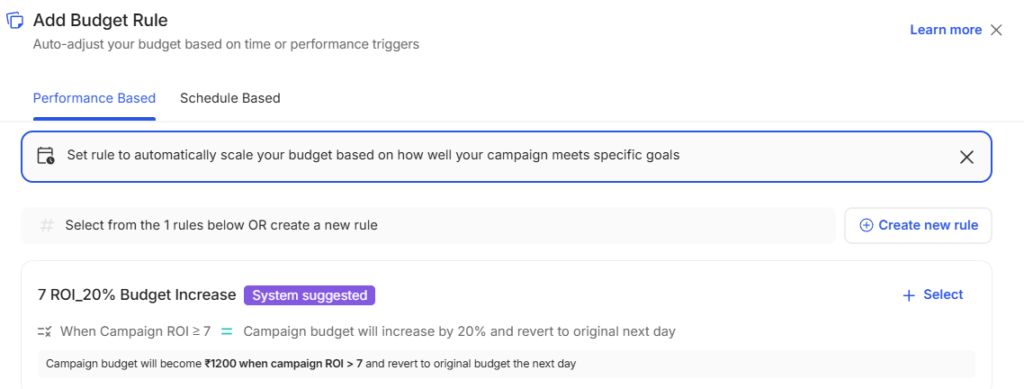
1. Performance-Based Budget Rules
Performance Rules automatically increase campaign budgets when predefined performance conditions are met. To configure a Performance Rule, advertisers need to specify:
- Budget increase value (fixed amount or percentage)
- Target ROI threshold
A Performance Rule is triggered only when:
- The campaign’s ROI meets or exceeds the configured threshold.
- The campaign budget is nearing exhaustion.
- The campaign satisfies minimum traffic requirements, such as sufficient clicks.
Performance Rules are supported for both Daily Budget and Total Budget campaigns.
2. Schedule-Based Budget Rules
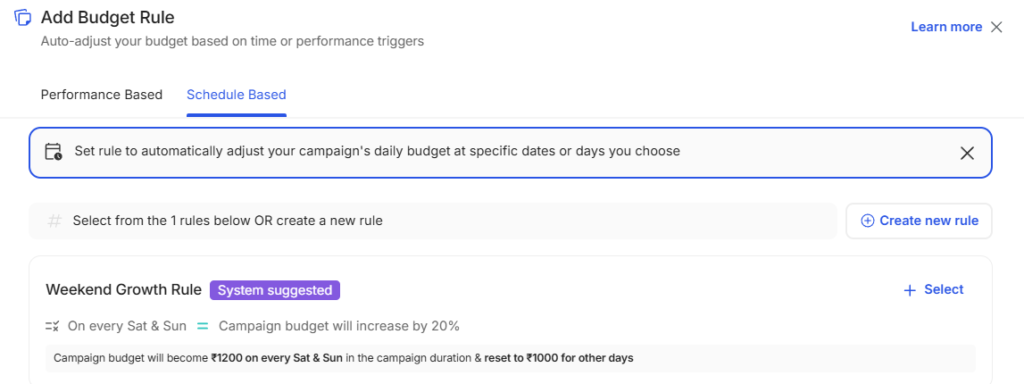
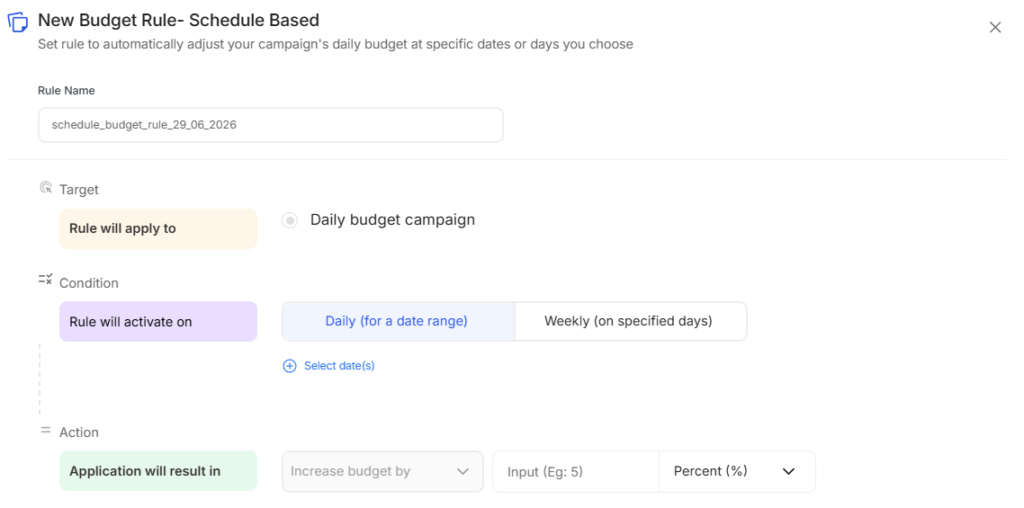
Schedule Rules automatically increase campaign budgets during selected time periods. Advertisers can configure these rules using:
- Specific weekdays (such as Saturdays and Sundays)
- Custom date ranges
- Budget increase value (fixed amount or percentage)
These rules are ideal for:
- Weekend traffic spikes
- Festive sales
- Seasonal promotions
- Brand-led campaigns
Schedule-Based Rules are available only for Daily Budget campaigns.
Maximum Budget Cap
Advertisers can optionally define a maximum budget cap while configuring Budget Rules. Once the campaign reaches the specified cap, no further automated budget increases occur. If no cap is configured, the campaign budget continues increasing whenever rule conditions are satisfied.
Budget Rule Behavior for Different Campaign Types
Daily Budget Campaigns
Daily Budget campaigns offer two automation options:
- Permanent Increase: The increased budget remains active after the rule executes.
- Temporary Increase (Revert): The budget automatically resets to its original value the following day.
For Daily Budget campaigns, ROI calculations are based on the campaign’s last seven days of performance.
Total Budget Campaigns
Total Budget campaigns support only Performance-Based Rules. In these campaigns:
- Budget increases are permanent.
- Temporary reset is not available.
- ROI is calculated across the entire campaign duration.
Smart Rules Manager
One of the biggest additions in this release is the Smart Rules Manager, a centralized dashboard for creating and managing Budget Rules. Using the Smart Rules Manager, advertisers can:
- Create new Budget Rules.
- Edit existing rules.
- Enable or disable rules.
- View all active and inactive rules.
- Tag multiple campaigns to a single rule.
- Remove campaigns from existing rules.
This centralized approach eliminates the need to edit each campaign individually.
Applying Budget Rules to Campaigns
Advertisers can add Budget Rules in multiple ways:
- During campaign creation
- While editing an existing campaign
- Through the Smart Rules Manager
Each campaign can have:
- One Performance Rule
- One Schedule Rule
This means a maximum of two Budget Rules per campaign, with only one rule of each type. Rules can be tagged to individual campaigns or applied across multiple campaigns simultaneously through bulk actions in the Smart Rules Manager.
Only enabled rules can be tagged to campaigns.
Reusing Existing Budget Rules
Previously created Budget Rules can be reused across multiple campaigns. Although the same rule can be applied to several campaigns, each campaign independently evaluates its own ROI, traffic, and budget conditions before triggering an automated increase.
Editing and Removing Rules
Existing rules can only be edited from the Smart Rules Manager. Campaign-level editing allows advertisers to tag or untag rules but does not allow modification of the rule itself.
Advertisers can also:
- Replace an existing Budget Rule.
- Remove a rule from a campaign.
- Untag multiple campaigns simultaneously.
What Happens When a Rule Is Disabled?
Disabling a Budget Rule has immediate consequences.
When a rule is marked inactive:
- All campaigns linked to that rule are automatically untagged.
- The rule immediately stops triggering.
- Every untagging action is recorded in the rule audit trail.
If the rule is enabled again later, campaigns are not automatically re-linked. Advertisers must manually tag campaigns again.
Can Budget Rules Be Deleted?
No.
Budget Rules cannot be permanently deleted. Instead, advertisers can toggle them between Active and Inactive states.
Disabled rules remain available inside the Smart Rules Manager for future use.
Manual Budget Changes
Budget automation does not prevent manual intervention. Advertisers can continue updating campaign budgets manually even when Budget Rules are active.
Additionally, every automated budget adjustment is recorded in campaign audit logs, making it easy to track all rule-driven changes.
System-Generated Budget Rules
Flipkart Ads may automatically create System-Generated Rules based on campaign patterns.These rules appear within the Smart Rules Manager with a “System Generated” label. Advertisers can review, edit, and tag campaigns to these rules just like manually created ones.
Final Thoughts
Budget Rules represent a significant step forward in campaign automation within Flipkart Ads. By automatically increasing budgets based on ROI or predefined schedules, advertisers can reduce manual effort, improve campaign continuity, and capture additional demand during high-performing periods.
Combined with the Smart Rules Manager, reusable rules, campaign-level flexibility, audit logs, and support for both performance-based and schedule-based automation, this feature provides advertisers with greater control over campaign budgets while minimizing operational overhead.
For brands running multiple PLA campaigns, especially during promotional events and festive sales, Budget Rules can become a valuable tool for maximizing campaign performance without constant manual monitoring.
Follow me on Linkedin for more content like this or read more blogs.